
Kraken: Buy Crypto & Stocks
Payward, Inc.Finance
4.38.39K Reviews
- Version
- 3.78.0
- Installs
- 5.00M
- Age Rating
- Everyone
Screenshots
Our Review of Kraken: Buy Crypto & Stocks
 Analysis by Appyee
I judge a finance app less by how busy its screen looks than by whether I can check a balance, understand what I’m looking at, and make a deliberate choice without feeling rushed. Kraken brings stocks and crypto together in one mobile experience, which can be appealing if you want fewer separate apps to keep track of. That convenience has a trade-off: a single place for multiple kinds of investing may feel less focused than a specialist tool, so it helps to know what you want to do before opening it.
What a quick session is good for
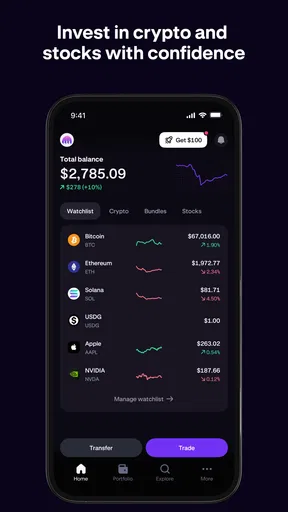
For a short check-in, I’d use the app to review my portfolio, look up an asset, or see what has changed since my last visit. Keeping stocks and crypto within the same app can make that routine simpler than switching between separate services. It does not make the underlying markets easier to predict, though. I find it most useful when I arrive with a clear question—such as whether a holding has moved—not when I open it just to react to every price change.
The app is free to download, and its finance focus makes it relevant to people who want to manage investments from a phone. Payward, Inc. is the developer. Kraken has a 4.5 average from around 49,000 ratings, with over 5 million installs, so it is an established option in the category. The store classifies it as suitable for everyone, but that age label should not be mistaken for a recommendation to trade: investing still carries financial risk, and new users should take time to understand what they are doing.
Speed without the pressure to act
In my view, the useful kind of speed here is getting to the information or action I need without wrestling with the interface. The original review found navigation intuitive and the dashboard easy to scan. Those qualities matter more during a quick everyday check than flashy visual effects would. Still, live financial information can encourage snap decisions, so I’d treat a fast route to a trading screen as a convenience, not a reason to place an order before checking the details.
A practical habit is to separate browsing from buying. I might check a price while waiting for an appointment, note what I want to investigate, and return later when I have time to review the order. That small pause is especially useful when stocks and crypto sit side by side: the convenience of seeing both can make it tempting to treat them as interchangeable, even though they are different types of investments with different risks.
Busy periods and the limits of a phone
When I’m comparing several holdings or thinking through a more involved trade, a compact screen becomes a real constraint. A phone is handy for a quick portfolio review, but it is not automatically the best place to study a complicated decision. I’d slow down, read each order carefully, and avoid trying to compare too many assets while distracted. If I wanted to build a detailed plan or keep several sources of research visible at once, I’d prefer a larger screen or a dedicated research tool alongside the app.
The app’s current version is 3.51.0, and it requires Android 8.0 or later. Those details help set practical expectations about compatibility, but they don’t tell me how smoothly it will run on every device. Performance can vary with a phone’s age, available resources, connection, and the task at hand. If the app feels sluggish, I’d first check my connection and close other demanding tasks before assuming the service itself is at fault. For high-stakes actions, I would not rely on a last-second tap over an unstable connection.
Getting Started with Kraken
First things first, downloading and setting up Kraken: Buy Stocks & Crypto is a breeze. Available on both Android and iOS, you can find it easily in your respective app store. Once you’ve got it installed, the onboarding process is straightforward. The app guides you through creating an account, verifying your identity, and linking your bank account. It’s all pretty intuitive, which is a big plus if you’re new to this whole trading thing.
User Interface and Experience
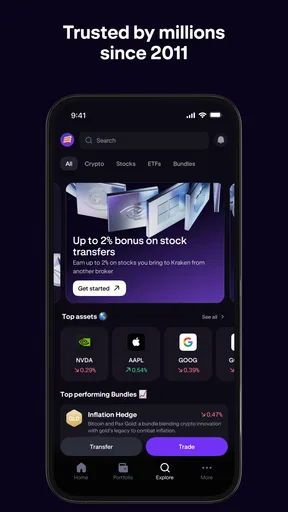
The app's interface is sleek and user-friendly. With a clean design, it doesn’t overwhelm you with too much information at once. The dashboard is where the magic happens, giving you a clear view of your portfolio, market trends, and recent transactions. I found the navigation quite intuitive. You can easily switch between stocks and crypto, and the search function works like a charm.
One of the features I appreciated was the educational resources. If you're like me and sometimes get lost in the jargon, these resources are lifesavers. They explain trading concepts in plain English, making it easier to make informed decisions.
Trading Features
When it comes to trading, Kraken doesn’t skimp on features. You can trade a wide array of stocks and cryptocurrencies, which is ideal if you’re looking to diversify your portfolio. The app also supports advanced order types, which is great for those who like to strategize their trades. Real-time market data keeps you updated, and the app’s alert system ensures you never miss a beat.
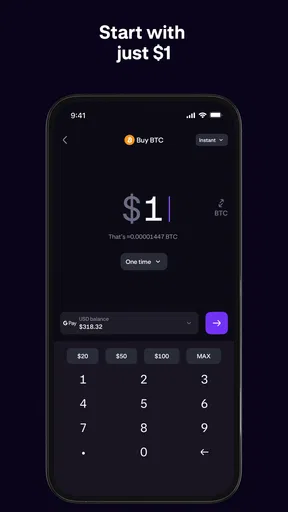
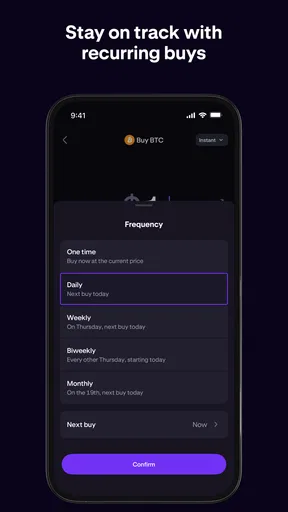
An interesting feature is the ability to set up recurring buys. This is perfect if you want to invest regularly without having to remember to make manual transactions each time. It’s a set-it-and-forget-it type of deal, which I found super convenient.
Security Measures
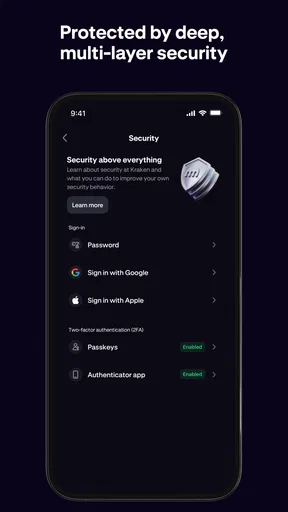
Security is a big deal when it comes to trading apps, and Kraken takes it seriously. The app employs robust security measures, including two-factor authentication and encryption, to keep your data safe. I felt comfortable knowing my investments were in a secure environment.
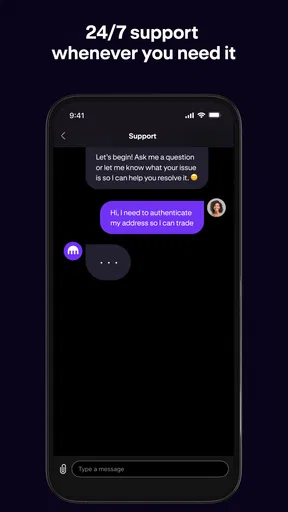
Additionally, the app provides a detailed FAQ and customer support options, so if you ever run into any issues, help is just a tap away. It’s reassuring to know there’s support ready to assist whenever needed.
Choosing it over a specialist alternative
Compared with the usual choice of using one app for stocks and another for crypto, Kraken’s appeal is having those activities together. That can reduce app-switching for someone who already wants exposure to both. A stock-focused brokerage may suit someone who mainly wants a traditional investment account, while a crypto-focused service may make more sense for a person whose needs are entirely about digital assets. I would choose based on the products and workflows I actually use, not simply on the promise of having everything in one place.
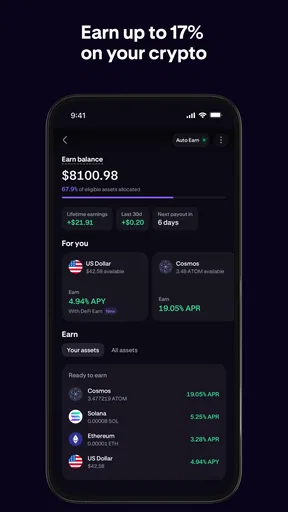
There are also reasons to keep a separate budgeting or portfolio-tracking app. A trading app is not necessarily a complete picture of household finances, and seeing investments together does not replace tracking bills, savings, or spending. I’d use Kraken for investment-related tasks and a dedicated finance tool for budgeting if I needed that broader view. This division keeps the app’s convenience from turning into an assumption that it handles every money-management need.
Small workflows that make a difference
Recurring buys can be useful for someone who prefers a regular investing routine, but I would review the amount and schedule before relying on them. “Set it and forget it” is convenient only if the plan still fits your budget and goals. A recurring purchase can continue even when your circumstances change, so I’d build a reminder to revisit the arrangement rather than treating automation as a substitute for attention.
Alerts also work best when they answer a specific question. I’d avoid setting so many that every market movement demands a response; that can create noise instead of useful awareness. If an alert draws me back into the app, I can pause and decide whether the information changes my plan. The combination of alerts, market data, and advanced order types offers flexibility, but it also asks the user to understand the choices rather than tap through them blindly.
A realistic use case might be checking a holding during a lunch break, then waiting until I’m somewhere quiet before reviewing a possible order. I’d confirm the asset, order details, and intended amount before submitting anything. If I’m unsure what a term means, I’d use the educational material first rather than treating a quick search or a market alert as enough context. That workflow keeps a brief phone session from becoming an impulsive trade.
Account access, costs, and recovery expectations
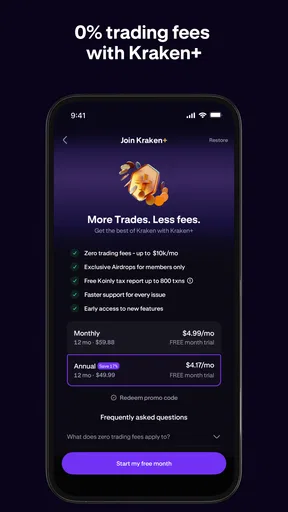
Kraken is free to download, while in-app purchases are listed from $4.99 to $49.99 per item. I would not assume that the download price answers every question about the cost of investing: before making a transaction, check the charges shown for that specific action and consider how they affect the amount you intend to invest. It is also sensible to understand any purchase prompt before confirming it, especially if you are only exploring the app.
Because setting up an account involves identity verification and linking a bank account, I’d have the information I need ready and complete those steps somewhere private, rather than trying to rush through them while distracted. For account access or a problem with a transaction, the app’s support options and FAQ are a reasonable starting point. I’d also keep account credentials secure and make sure I understand the available sign-in protections before relying on the app for frequent use. I would not treat any mobile app as a substitute for keeping personal account details safe.
Who will get the most from it
I think Kraken is a better fit for someone who wants a single mobile place to follow and trade stocks and crypto, values a clear dashboard, and is willing to learn the order choices available. It can also suit a beginner who wants educational explanations close to the trading tools, provided that person is comfortable taking time to learn rather than treating a simple interface as a guarantee of simple decisions.
I’d skip it if I wanted a hands-off savings product, a full household budget, or a purely research-focused workstation. It is also not the right answer for someone who finds frequent market updates stressful or who is not prepared to think through investment risk. In those cases, a budgeting app, a specialist brokerage, or a less market-centered way to manage money may be a better match. The right choice depends on the task, not on how many functions an app can put on one screen.
Final Thoughts
Overall, Kraken: Buy Stocks & Crypto is a solid choice for anyone looking to get into trading. Its user-friendly interface, comprehensive trading features, and strong security make it a reliable platform. Whether you’re a newbie or an experienced trader, the app offers something for everyone. So, if you’re ready to explore the world of stocks and crypto, give Kraken a try and see where it takes you!
Happy trading, and may your investments flourish!
Verdict
Strengths of Kraken: Buy Crypto & Stocks
- User-friendly interface for easy navigation.
- Wide variety of cryptocurrencies available.
- Advanced trading features for experts.
- Strong security measures in place.
- Low transaction fees compared to competitors.
Limitations of Kraken: Buy Crypto & Stocks
- Limited customer support response time.
- Complex verification process for new users.
- Not all fiat currencies supported.
- Lacks some advanced charting tools.
- Occasional app performance issues reported.
Similar Picks in This Category
View All
Google Wallet
Google LLC4.3

Airtel: Recharge, Bank & Loans
Airtel4.0

PayPal - Pay, Send, Save
PayPal Mobile4.2

DANA Indonesia Digital Wallet
PT Espay Debit Indonesia Koe4.5

Binance: Buy Bitcoin & Crypto
Binance Inc.4.8

Cash App
Block, Inc.4.7
Frequently Asked Questions
What is Kraken: Buy Stocks & Crypto?
Kraken: Buy Stocks & Crypto is a versatile app designed for trading stocks and cryptocurrencies. It offers users a seamless platform to manage their investment portfolios, track market trends, and execute trades efficiently. With its user-friendly interface and robust security features, Kraken caters to both beginners and experienced traders.
Is Kraken secure for trading and storing assets?
Yes, Kraken is known for its high level of security. The app uses advanced encryption and two-factor authentication to protect user accounts and data. Additionally, Kraken employs cold storage for the majority of its assets to prevent unauthorized access, ensuring your investments are kept safe.
What are the key features of Kraken?
Kraken offers a range of features including real-time market analysis, customizable alerts, and a diverse selection of stocks and cryptocurrencies. Users can also benefit from detailed charts, trading pairs, and educational resources, making it a comprehensive tool for both novice and expert investors looking to diversify their portfolios.
Does Kraken support multiple currencies and payment methods?
Yes, Kraken supports a wide variety of fiat currencies and cryptocurrencies, allowing for flexible trading options. The app also accepts multiple payment methods such as bank transfers, credit/debit cards, and even some digital wallets, making it convenient for users worldwide to fund their accounts and start trading.
What are the fees associated with using Kraken?
Kraken’s fee structure is competitive and varies depending on the type of trade and the volume. It employs a maker-taker fee model, where fees are typically lower for makers (those who provide liquidity) than for takers (those who take liquidity). Users should review the fee schedule on Kraken’s website to understand specific charges based on their trading activity.
